VLC media player rolled out its new update 2.2.1 “Terry Pratchett” few months ago. Since then, A lot of bugs have been reported by the users.
One of the major bug is “Microsoft Visual C++ Runtime Library Runtime Error”.
This happens mostly when you try to play multiple audio or video files at a same time by VLC.
HOW TO SOLVE??
1. First of all, you need to update/reinstall your Microsoft Visual C++ Redistributable Package. You can download it from the link provided below-
Download Microsoft Visual C++ Redistributable Package
Or you can let windows update it for you. Whenever an update will be available, windows update will notify you.
2. Then you need to-
.Go to start > all programs
.Find Video Lan > VLC media player- reset preferences
.Click on it and reset the preferences.
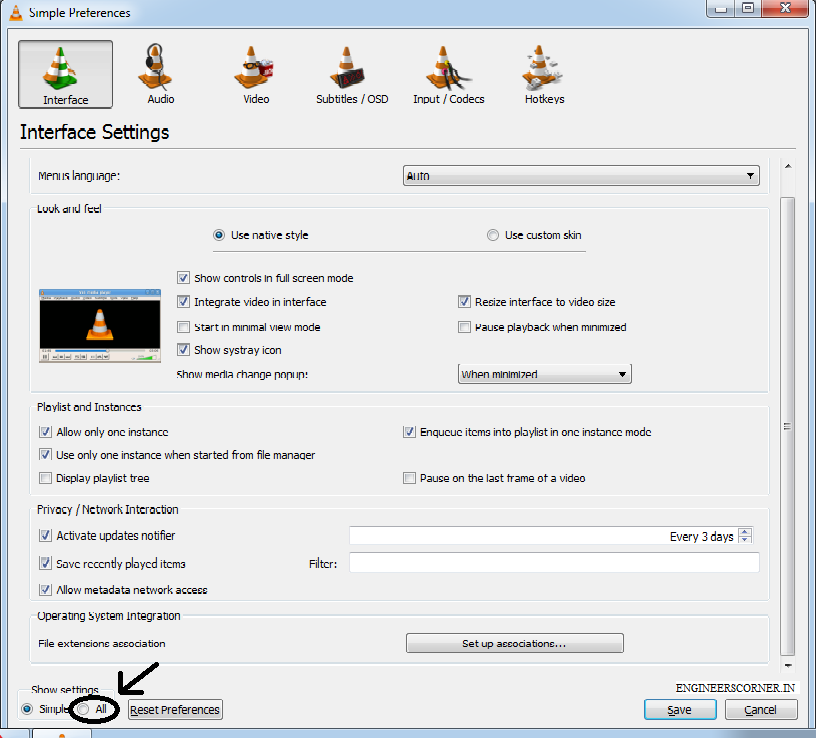
.Then open vlc > tools > preferences > show settings > all
.Then go to playlist > tick the following five boxes >
.Click on save and now exit.
Now select mutiple audio or video files and press enter (if default VLC is set).”Microsoft Visual C++ Runtime Library Runtime Error” won’t trouble now.
KEEP YOURSELF SUBSCRIBED TO ENGINEERSCORNER.IN AND KEEP YOURSELF UPDATED!.
Three men who genuinely do not like each other agreed on something this weekend. That…
Apple usually gives Indian buyers one small consolation at launch time. New phone comes in…
Michelin started selling the Primacy 5 in India on 3 August. It is the first…
At around 2 pm on Saturday, 25 July, police fired tear gas shells at protesters…
Last Updated: 24th July 2026:- Something strange has happened in Indian politics this year. A…
If you hold an engineering diploma and have ever considered serving the nation in uniform,…


View Comments
Thanks for this - was searching everywhere for this fix.
That was so much helpful ! Made my day
Thanks Abhishek, Your feedback help us to serve you better and motivate us
Thanks for the quick fix ^^ this helped alot.
Thanks
You are a god! Thank you for sharing this fix.
Glad that it helped! keep sharing and subscribing.
What a timely fix. Been looking for this Al over!
thanks