Hey, Today i’m going to tell you some hidden secrets of How to Make your Internet Speed 20% Faster. Yes, you read it right you can make your current Internet speed even 20% more faster. Everyone Searching for this how to Make our Internet speed more faster. Now your solution is Here & Solved by Engineers Corner. Most of the users Having Internet Connection of Idea, Airtel, BSNL, Aircel, Uninor always face slow internet connection whether it is 2G or 3G. and after wasting so much money on their operator/Internet they have no results & keep using the slow internet connection. But now your solution is here whether you are using an Netsetter, Data Connector, Bluetooth or any Internet Connection you can now enjoy your internet speed 20% Faster than before.
Well, let me tell you this an another part of engineering but you don’t need any special skills to Activate or do the below setting to make your internet speed fast. What you have to do is jut follow the steps below given with pictures which will help you to do setting on your Operating system. Please Note All Windows XP, Windows 7, Windows 8 has this settings but we are showing you in Windows 8. The Images below will help you to make setting fast & easily. The Images are strictly copyright of ©Engineers Corner hence should not produced or used anywhere else.
How it Works?
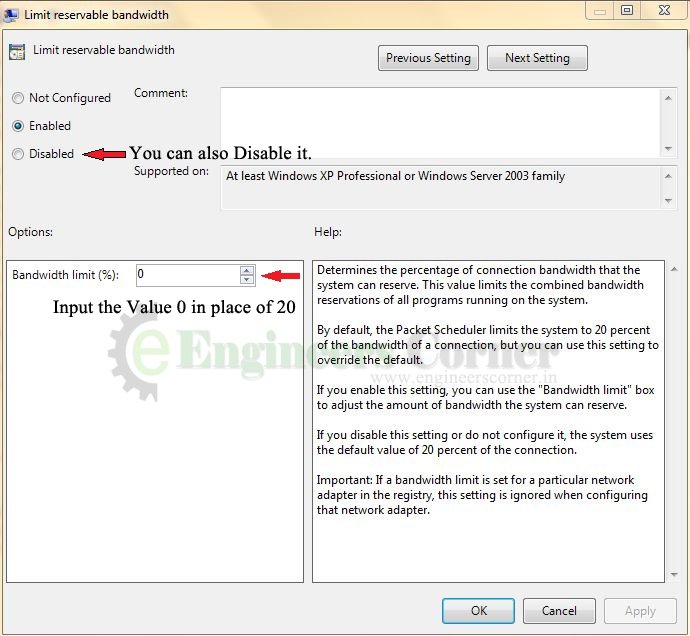
Actually, Our Operating System Reserve a Packet Data of 20% as a Bandwidth of a connection. If you will not override this setting the Default 20% will be automatically save. which reserves the 20% Bandwidth connection of your system. That is why it is called Limit reservable bandwidth. if this bandwidth is 0% or disabled then the system will not have any reserves Bandwidth connection. and this is what you have to do to overcome with these solutions.
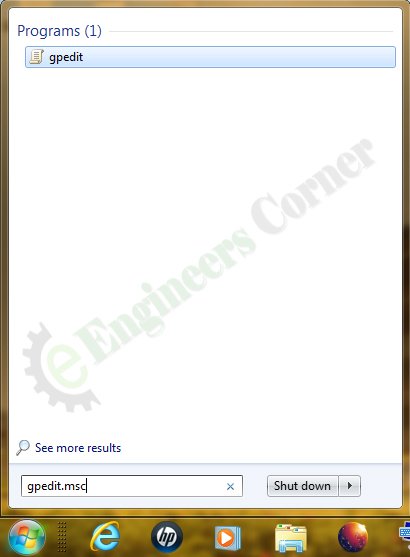
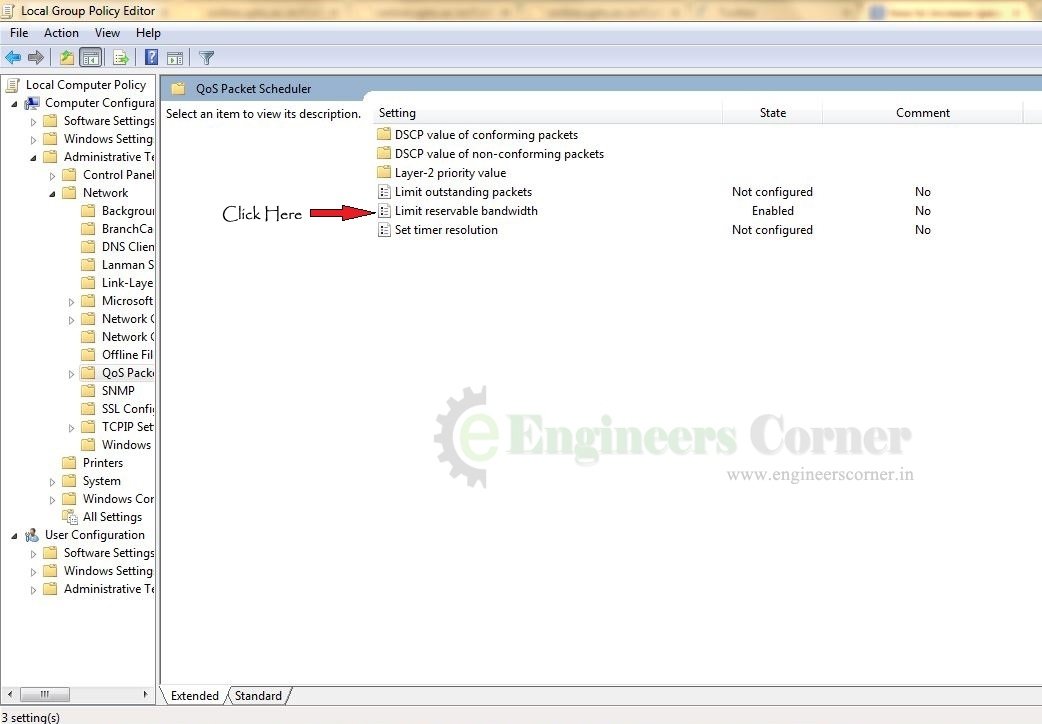
Here is the Image for the same Step.
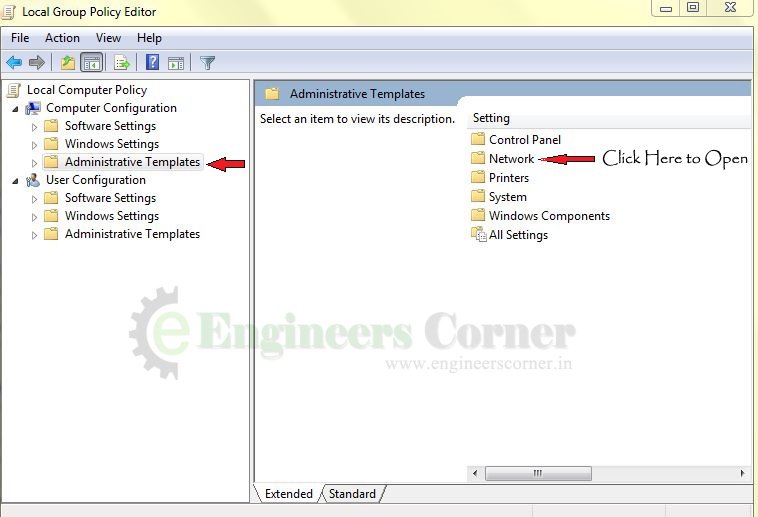
Now, After the Step 1. A new window will open in that window Click on the “Administrative Templates” on the Left hand Side of the Window as shown in Picture below.
so, You are done now, Enjoy the seamless, Smooth Fast Internet Speed 20% Faster than Before. Believe me there are lots of Tricks which you can use to make your internet speed even two times fast. There are also some Hidden tricks to Enjoy Free Internet on Your SIM idea,Airtel, Reliance, Aircel, BSNL, Uninor, Netsetter etc. Yes, you can use Free internet by using only simple tricks.
Note: This trick may not work for everyone.
Regards-
Yatharth Singh
Engineers Corner
Comment Below if you have any doubt/confusion regarding this.
Three men who genuinely do not like each other agreed on something this weekend. That…
Apple usually gives Indian buyers one small consolation at launch time. New phone comes in…
Michelin started selling the Primacy 5 in India on 3 August. It is the first…
At around 2 pm on Saturday, 25 July, police fired tear gas shells at protesters…
Last Updated: 24th July 2026:- Something strange has happened in Indian politics this year. A…
If you hold an engineering diploma and have ever considered serving the nation in uniform,…
View Comments
Rahi classes provide AIEEE Coaching in Patna, engineering entrance coaching, PMT coaching classes in Patna, Bihar. Find course details, duration, faculty & fee structure of engineering entrance exam preparation.For more detail call us 9308870868 or visit our website http://www.rahiclasses.com
It is very helpfully
And please send best back it college in India
Bsc. IT college in India