
VLC media player rolled out its new update 2.2.1 “Terry Pratchett” few months ago. Since then, A lot of bugs have been reported by the users.
One of the major bug is “Microsoft Visual C++ Runtime Library Runtime Error”.
This happens mostly when you try to play multiple audio or video files at a same time by VLC.
HOW TO SOLVE??
1. First of all, you need to update/reinstall your Microsoft Visual C++ Redistributable Package. You can download it from the link provided below-
Download Microsoft Visual C++ Redistributable Package
Or you can let windows update it for you. Whenever an update will be available, windows update will notify you.
2. Then you need to-
.Go to start > all programs
.Find Video Lan > VLC media player- reset preferences
.Click on it and reset the preferences.

.Then open vlc > tools > preferences > show settings > all
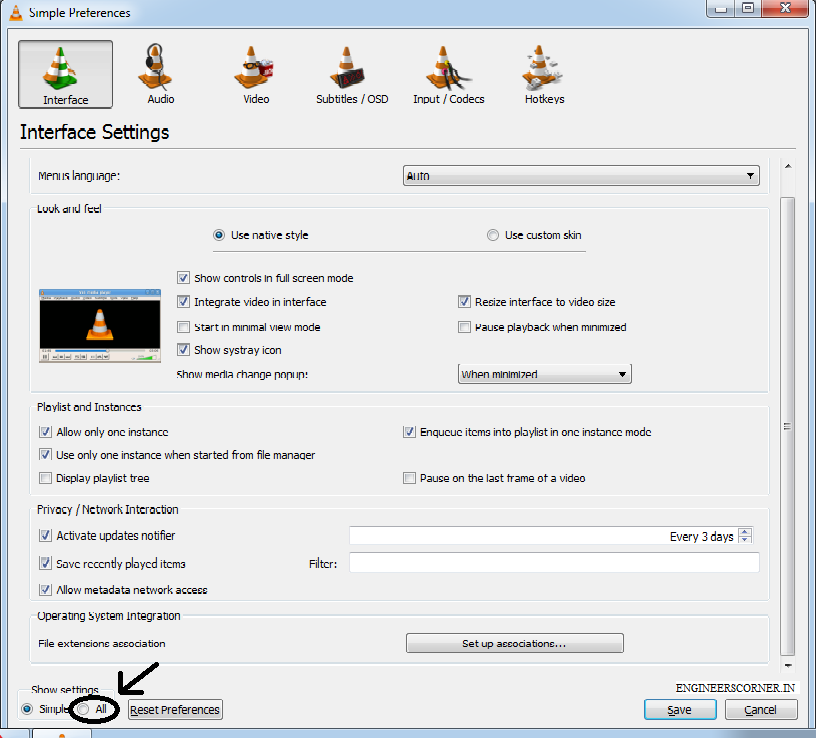
.Then go to playlist > tick the following five boxes >

.Click on save and now exit.
Now select mutiple audio or video files and press enter (if default VLC is set).”Microsoft Visual C++ Runtime Library Runtime Error” won’t trouble now.
KEEP YOURSELF SUBSCRIBED TO ENGINEERSCORNER.IN AND KEEP YOURSELF UPDATED!.






Thanks for this – was searching everywhere for this fix.
That was so much helpful ! Made my day
Thanks Abhishek, Your feedback help us to serve you better and motivate us
Thanks for the quick fix ^^ this helped alot.
Thanks
You are a god! Thank you for sharing this fix.
Glad that it helped! keep sharing and subscribing.
What a timely fix. Been looking for this Al over!
thanks